Stylish custom themes for any website
Stylish custom themes for any website
Метаданные расширения
Используется


Stylish lets you style the web according to your personal taste.
★ Give Reddit a dark mode, use minimalist Facebook themes, or change the look of Google, Twitter and any of your favorite sites
★ Customize website backgrounds, color schemes, youtube skins, fonts and even animations
★ Easily disable, enable, edit or delete any of your installed styles (themes)
★ Create your own user styles (themes) using Stylish’s CSS editor, and share it with millions of Stylish users
Stylish has themes & skins for websites and web apps from all over the world, such as:
✔ Search Engines – Google, Baidu, Yahoo
✔ Email – Gmail themes style & personalize your email to your liking
✔ Social Networks – Facebook, Twitter, Reddit, Instagram, WeChat, and even Whatsapp themes!
✔ Developer Sites – Stackoverflow, Github, JIRA, Thunderbird
✔ Browsers – Chrome, Firefox, Opera, Safari, Baidu
✔ Youtube Themes – Stream videos night and day with your favorite Youtube skins
***Getting in Touch***
Stylish is a living, breathing product that is updating and growing all the time. If you have comments, suggestions, or experience any issues with Stylish, feel free to contact us at https://userstyles.org/contact. We’ll get back to you as soon as we can.
***Support***
You’ll find tutorials on how to use Stylish, including how to install styles (themes), create, and upload them to the Stylish library at https://userstyles.org/help.
If you’ve encountered a broken theme, go to the theme’s page on the Stylish website and contact the style creator. The Stylish community is very responsive and eager to receive feedback. Don’t forget to give themes a thumbs-up if you like them!
✔ To build your own styles, check out instructions here: https://github.com/stylish-userstyles/stylish/wiki
**We care about your privacy and thus it is important to us that you understand our data practices:
Stylish provides you with services that include the suggestion of and access to relevant styles for web pages you visit, as well as the install count for each style. In order to enable this service, we collect browsing data, as detailed in our privacy policy: https://userstyles.org/login/policy
The browsing usage data collected includes: visited URLs, your Internet Protocol address, your operating system and the browser you are using, and the date and time stamp.
The data collected is not collected nor used to allow the identification of any individual user, and you may always opt-out from this automatic data collection in the add-on option page.
Сообщить о нарушении правил этим дополнением
Если вы считаете, что это дополнение нарушает политики Mozilla в отношении дополнений, или имеет проблемы с безопасностью или приватностью, сообщите об этих проблемах в Mozilla, используя эту форму.
Не используйте эту форму, чтобы сообщать об ошибках или запрашивать новые функции в дополнении; это сообщение будет отправлено в Mozilla, а не разработчику дополнения.
Этому дополнению нужно:
Метаданные расширения
Используется
Stylish lets you style the web according to your personal taste.
★ Give Reddit a dark mode, use minimalist Facebook themes, or change the look of Google, Twitter and any of your favorite sites
★ Customize website backgrounds, color schemes, youtube skins, fonts and even animations
★ Easily disable, enable, edit or delete any of your installed styles (themes)
★ Create your own user styles (themes) using Stylish’s CSS editor, and share it with millions of Stylish users
Stylish has themes & skins for websites and web apps from all over the world, such as:
✔ Search Engines – Google, Baidu, Yahoo
✔ Email – Gmail themes style & personalize your email to your liking
✔ Social Networks – Facebook, Twitter, Reddit, Instagram, WeChat, and even Whatsapp themes!
✔ Developer Sites – Stackoverflow, Github, JIRA, Thunderbird
✔ Browsers – Chrome, Firefox, Opera, Safari, Baidu
✔ Youtube Themes – Stream videos night and day with your favorite Youtube skins
***Getting in Touch***
Stylish is a living, breathing product that is updating and growing all the time. If you have comments, suggestions, or experience any issues with Stylish, feel free to contact us at https://userstyles.org/contact. We’ll get back to you as soon as we can.
***Support***
You’ll find tutorials on how to use Stylish, including how to install styles (themes), create, and upload them to the Stylish library at https://userstyles.org/help.
If you’ve encountered a broken theme, go to the theme’s page on the Stylish website and contact the style creator. The Stylish community is very responsive and eager to receive feedback. Don’t forget to give themes a thumbs-up if you like them!
✔ To build your own styles, check out instructions here: https://github.com/stylish-userstyles/stylish/wiki
**We care about your privacy and thus it is important to us that you understand our data practices:
Stylish provides you with services that include the suggestion of and access to relevant styles for web pages you visit, as well as the install count for each style. In order to enable this service, we collect browsing data, as detailed in our privacy policy: https://userstyles.org/login/policy
The browsing usage data collected includes: visited URLs, your Internet Protocol address, your operating system and the browser you are using, and the date and time stamp.
The data collected is not collected nor used to allow the identification of any individual user, and you may always opt-out from this automatic data collection in the add-on option page.
Сообщить о нарушении правил этим дополнением
Если вы считаете, что это дополнение нарушает политики Mozilla в отношении дополнений, или имеет проблемы с безопасностью или приватностью, сообщите об этих проблемах в Mozilla, используя эту форму.
Не используйте эту форму, чтобы сообщать об ошибках или запрашивать новые функции в дополнении; это сообщение будет отправлено в Mozilla, а не разработчику дополнения.
Этому дополнению нужно:
Stylish для Яндекс.Браузера
В интернет-обозревателе от компании Yandex довольно много настроек, отвечающих за изменение интерфейса программы. Но ни одна из них не затрагивает внешний вид сайтов, хотя нередко привычный дизайн страниц надоедает пользователям. К счастью, его можно преобразить, например, установив расширение Stylish для Яндекс.Браузера. Мы рассмотрим нюансы его загрузки и использования.
Руководство
Собственно говоря, главная функция плагина заключается в настройке внешнего вида интернет-страниц. Поскольку его особенности смысла разбирать нет, мы перейдем непосредственно к инсталляции. Осуществляется она следующим образом:
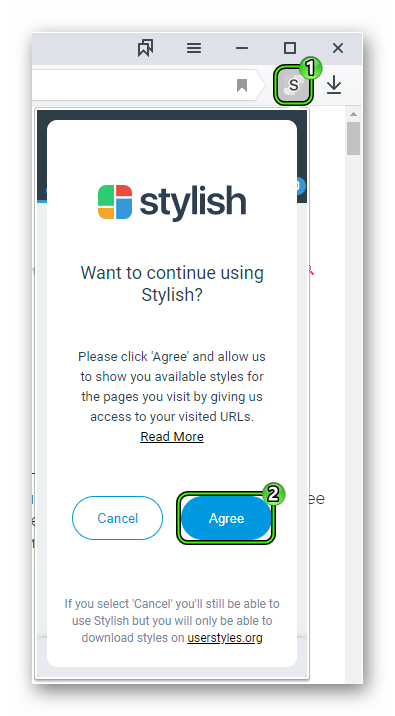
Теперь Стайлиш нужно активировать для этого сначала нажмите на новый значок (английская буква S в серой обводке), а потом на пункт Agree.Сразу же после кликните на зеленый «кружок».
Далее, посетите сайт, который вы хотите преобразить. В качестве примера мы рассмотрим социальную сеть ВКонтакте. Опять нажмите на значок расширения, найдите подходящее оформление, а потом примените его с помощью кнопки «Устан. стиль».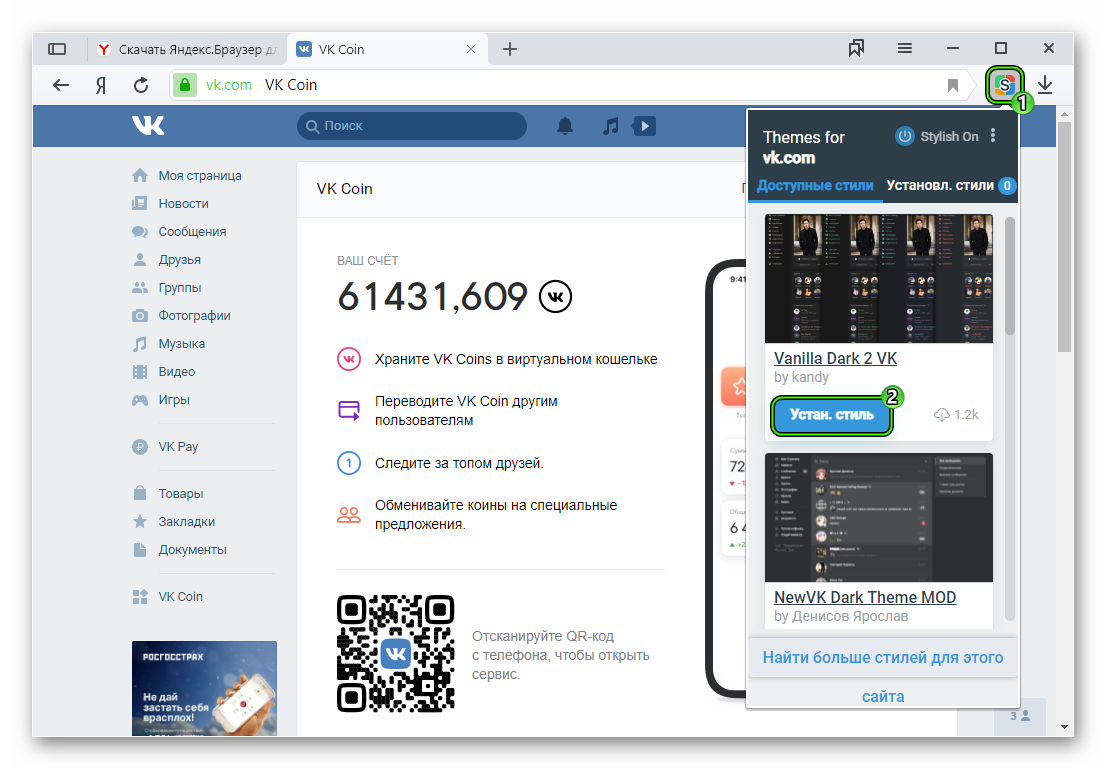
Для отключения плагина в окне управления щелкните ЛКМ на надпись Stylish On.
Дополнение
Полная библиотека стилей для различных веб-ресурсов представлена здесь. Откройте подходящее оформление и нажмите Install Style. А потом примените его через окошко расширения.
Stylish for Windows
Apply different looks to websites
Stylish is a free browser extension that lets you dress up the appearance of your web browser and the websites you visit. This is a browser add-on by Userstyles.org and gives you access to the popular theme personalization website’s library. With it, you can also create your own custom designs if you’re familiar with webpage coding. If you’re not, you can just request designs from its theme creator community.
What is Stylish app?
Stylish is a user style manager that can change the appearance of web pages in your browser without changing the content. It does so by including user-supplied CSS style sheets with those supplied by the website itself. Originally developed by Jason Barnabe, it offers customization and personalization for your website themes, providing you both the editing tools that allow you to write your own style and the ability to install designs made by other people.
The webpage styles may simply change just one web page or all of the pages on a domain, so if you like multiple customized sites, you’ll have to apply several designs. Thus, this browser extension helps a lot since you don’t have to visit its website every time you want to change something. You just have to install the extension and then you can pin it to your toolbar to easily enable and disable designs.
How can I activate Stylish?
To start using Stylish, you first have to go to a website whose design you’d like to change for your browser. Click on the add-on’s icon on your browser toolbar to open its menu. Here, you’ll see the top 6 available themes for the website you’re on. If you want to check out more options, click “Find more styles for this site” underneath the pop-up window. This will open up Userstyles.org where you can continue looking for the right design.
The pop-up window has two tabs: Library and Installed. To install a style, simply choose your preferred design under Library and click “Install Style” on its option—and if you’re on the Userstyles website, just open up the design’s page and click the same button there. Afterward, you can now see the style under the Installed tab, where you can quickly enable and disable it. Take note that the pop-window only displays choices for the website you’re currently on.
To see all installed designs, click the button with the three dots on the top-right corner of the window and choose “Manage All Styles.” This will bring you to a separate webpage containing your style collection, letting you easily edit, update, or delete them. Similarly, you can create your very own design by choosing “Create New Style” on the three dots’ menu. However, this feature isn’t recommended for users who have no knowledge of CSS code editors.
For decoration lovers
All in all, Stylish is a great tool for anyone who likes personalizing their web browsers. While the changes you implement will only show on your computer, it’s still a fun program to try out if you don’t like a certain website’s look. It doesn’t fully offer easy customization for non-tech-savvy users, however, so you will have to rely on either the website’s library or the creator community to design the specific style you want.